App States
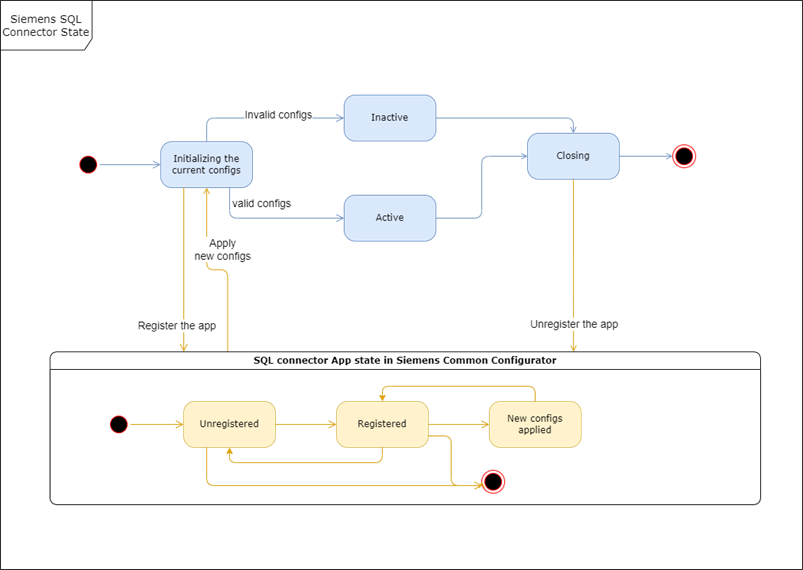
Initializing State
Within this state the app will do the following:
- read the current configurations from the specified file e.x.
./configs/current-config.json
- Then register itself in the Siemens Common Configurator in a separate thread, since this will be done repeatedly due to the registration having an expired time.
- Initialize and start the MQTT communicator and the DB service, in case of any invalid configs, the app will go inactive.
Inactive State
In case of invalid configs either for the MQTT broker or the DB, the app will be inactive until a new Configuration has been deployed from the Common Configurator.
Active State
Insert into Database
- In this state the app will be able to receive the MQTT messages, process them and then execute the insert SQL statements to the DB using the DB service.
- Based on the configs the app could be in one of these two modes (realtime or buffer).
- In realtime the app will immediately write the data to the DB, while in the buffer mode it will write the data to DB once the buffer is filled.
- If the DB connection within this state is lost, the received messages will be maintained in the buffer, and once the DB connection is restored the writing to DB will be resumed.
- No matter how the buffer size is configured the data will be written to DB in chunks. Please note that the max allowed chunk size is 500 in case of messages with max 4 properties
Reading from Database
- Select mode: every acquisition cycle select the top fetchsize data from table ordered by selected columns and send it to the databus
- Newest mode: Newest Mode will poll every acquisition cycle all data from the table sorted by the first column which is ticked as "sort by this column" and then compare it with the newest value of the last poll and sends the top fetchsize data to the databus
Closing State:
When the app is shut down, the app will:
- try to empty the buffer if there are more messages than the chunk size, only the chunk will be inserted and the rest will be ignored.
- close the connection to MQTT and unsubscribe from the topics.
- unregister itself from the Siemens Common Configurator.